OpenCode Go Usage Limits in 2026: $10/Month and Is It Worth It?
Published on:
Reading time: 9 min
Topic: Technology
Author: Leandro Valencia
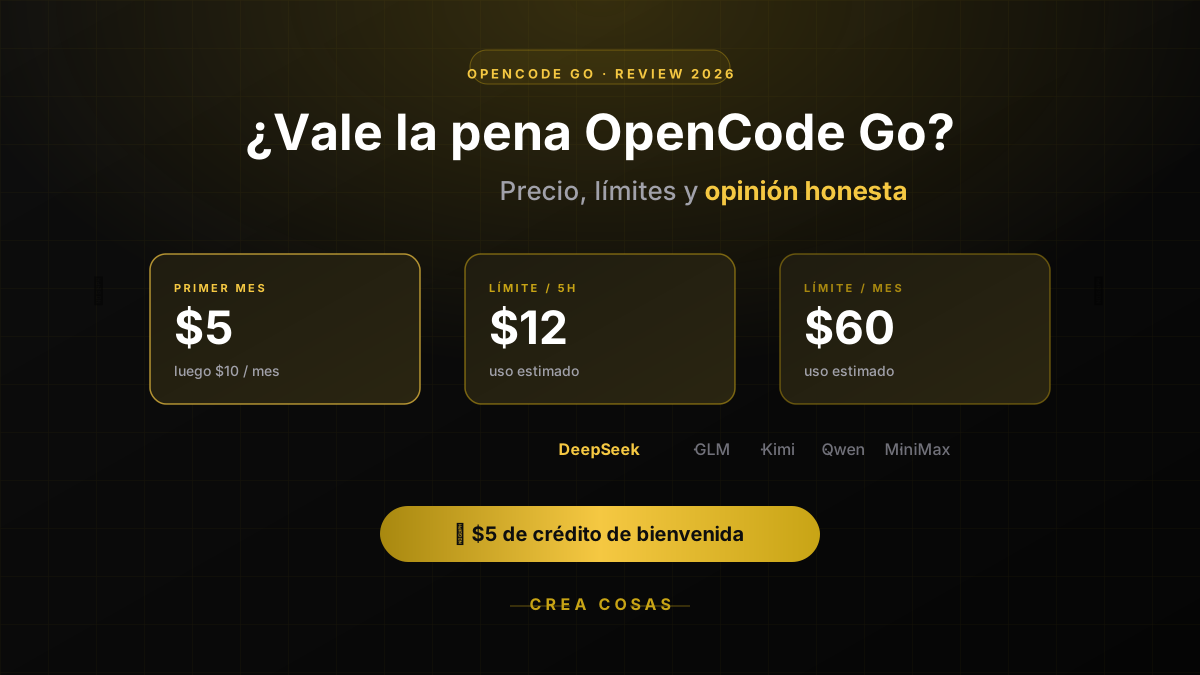
The verdict on OpenCode Go: yes, it's worth it — with caveats. $5 the first month, $10/month after — which models it includes, how its usage limits really work, and when you shouldn't pay for it. Includes how to get an extra $5 in credit.
Table of Contents
- What is OpenCode Go?
- How much does it cost and how do the limits work?
- Who is OpenCode Go for?
- How to get the most out of your subscription
- How to get started
- My personal take on OpenCode Go
- So, is OpenCode Go worth it?
What is OpenCode Go?
OpenCode Go is a low-cost subscription for accessing AI models built for programming. The plan costs $5 for the first month and $10 per month from the second month on.
It works as a provider inside OpenCode and can also be used with other compatible agents. To connect it, you need an API key, configure it in your tool, and pick the model you want to use.
Processing happens in the cloud, so you don't need a powerful graphics card or to run anything locally to get started.
The list of available models can change over time, but it currently includes options like:
- Grok 4.5
- GLM-5.2 and GLM-5.1
- Kimi K3
- Kimi K2.7 Code
- Qwen3.7 Max and Qwen3.7 Plus
- MiniMax M3
- DeepSeek V4 Pro and DeepSeek V4 Flash
You can check the updated list in the official OpenCode Go documentation.
How much does it cost and how do the limits work?
The advertised price is simple:
- $5 for the first month
- $10 per month from the second month on
But a flat fee doesn't mean unlimited use. OpenCode Go applies limits based on the estimated value of the requests you process:
- Up to $12 of usage every 5 hours
- Up to $30 of usage per week
- Up to $60 of usage per month
The actual number of requests you can make depends on the model you choose: cheaper models allow far more requests than the more expensive ones. A simple task with a fast model consumes much less budget than a complex refactor with an advanced model and a large context window.
The best parts of OpenCode Go
An easy-to-understand price
Paying $10 a month is more predictable than a usage-billed API. It's especially useful for students, independent developers, and creators who want to keep their spending under control without surprises on the bill.
Access to several models under one subscription
You're not locked into a single model. You can pick between several options depending on the task: generating code, fixing bugs, analyzing an entire project, or modifying multiple files at once.
No need for powerful hardware
Since the models run in the cloud, you can use OpenCode Go from a regular laptop. You just need a terminal and a stable internet connection, not a high-end GPU.
Built for working from the terminal
OpenCode is designed to interact with real projects: reading files, analyzing a repository's structure, proposing changes, and helping you automate repetitive tasks. That makes it especially appealing if you already work with Git, code editors, and terminal tools.
Good value for the price
The plan aims to give you more usage value than the monthly price suggests. The actual outcome depends on the model you pick and how complex your tasks are, but as a starting point the balance is favorable.
The weak points you should consider
It's not unlimited use
This is the most important point in the whole article. Limits are applied by time period and by estimated usage value. If you work with expensive models or very large contexts, you can burn through your quota faster than expected.
That's why it's worth not relying on OpenCode Go alone: if you want to explore other providers to round out your AI portfolio and avoid running out of quota mid-month, check out our dedicated article on how to diversify across several AI providers for coding.
Not all models perform the same
The fact that several models are included doesn't mean they're all the same quality. Some are better at generating code, others at reasoning through complex bugs, and others shine at quick, simple tasks. It's worth testing several before settling on one as your main option.
The model list can change
OpenCode notes that model availability can change over time. It's good practice to check the official documentation before committing to a workflow built around one specific model.
It can generate extra costs if you don't check the settings
If you have OpenCode Zen balance usage enabled, the service can keep consuming that balance after you hit your Go limits. It's worth reviewing this setting if you want to avoid unexpected charges.
Privacy depends on your workflow
Before sending proprietary code, keys, customer data, or sensitive information to any AI service, review its privacy policies and your company's rules.
Who is OpenCode Go for?
It's a good fit if:
- You code regularly and want an AI assistant in the terminal.
- You're a student, independent developer, or creator working on your own projects.
- You want to experiment with several open models without committing to just one.
- You prefer a predictable monthly cost over usage-based billing.
- You don't want to invest in powerful hardware to run models locally.
It's probably not your best option if:
- You need enterprise guarantees or a formal SLA.
- Your company doesn't allow sending code to external services.
- You depend on a specific model that isn't included in the plan.
- You work with a consistently very high volume of requests.
- You prefer a fully visual experience inside an editor.
How to get the most out of your subscription
Pick the model based on the task. Use fast, cheap models for simple questions, documentation, or small changes. Save the more advanced models for complex debugging, architecture decisions, and changes that touch several files at once.
Work with well-organized repositories. Response quality improves when the project has a clear structure, installation instructions, and basic documentation like a README.md.
Give concrete instructions. Instead of writing "fix this project," describe the problem, state the behavior you expect, and specify which files the agent can modify. For example:
Analyze the authentication error, review the files related to the session, and propose a solution. Don't touch the database yet.
Always review the changes. A code agent can modify several files or introduce errors that aren't immediately obvious. Review the diff, run your tests, and rely on Git so you can easily roll back changes.
Keep an eye on your usage. Check consumption from the console and pay attention to tasks that send a lot of context: large projects and long conversations eat into your limits faster.
How to get started
- Create an OpenCode account.
- Subscribe to OpenCode Go.
- Copy your API key.
- Open OpenCode and run
/connect. - Select OpenCode Go as your provider.
- Run
/modelsto pick the model you want to work with.
The setup can change with product updates, so it's worth checking the official OpenCode providers guide before you start.
My personal take on OpenCode Go
After using it for a while, my take is simple: I've really enjoyed working with OpenCode, but I don't treat it as my only provider.
In practice, the limit gets hit faster than you'd expect, especially if you work with the more advanced models or long sessions. That's why my recommendation is not to rely on OpenCode Go alone, but to combine it with other tools — like Z.ai — to build a small portfolio of providers that gives you room to maneuver when one runs out of quota.
Personally, I combine four tools: Claude, OpenAI, OpenCode, and Z.ai. Each one plays a different role in my workflow. For example, I usually write specs with Claude or another advanced model, where reasoning and judgment matter most, and then execute those already-defined tasks with a cheaper model inside OpenCode once the plan is clear and all that's left is implementation.
If you want to dig deeper into this idea of not depending on a single provider and see the other providers you can add to your portfolio, I wrote a full article on it: Why in 2026 You Shouldn't Depend on a Single AI Provider for Coding.
In the end, the key isn't finding "the best" tool — it's building a workflow that helps you meet your personal and professional goals without being tied to a single provider.
If you want to see that workflow developed in depth — including how to compare Go with OpenCode Zen and what each agentic turn actually costs by model — I wrote a dedicated article: OpenCode Zen and Go: what you can actually get done for $10 a month.
So, is OpenCode Go worth it?
For many developers, yes. For $10 a month it offers an accessible way to try several coding models and use them from a terminal-based workflow.
Its main advantage is the combination of price, variety, and ease of access. Its main limitation is that the limits depend on the model and your level of usage, so it shouldn't be mistaken for an unlimited subscription — and it's worth pairing it with at least one other provider.
Our recommendation is to try it during the $5 first month and measure three things: how much you actually use it, which models turn out to be genuinely useful for your work, and whether the limits fit your coding pace.
🎁 Start with $5 in free credit Before paying for the full plan, sign up for OpenCode Go with this link and get $5 of credit applied directly to your usage limits. It's the cheapest way to test whether the plan fits your workflow before committing to the monthly payment.
Have you already tried OpenCode Go? Tell us which model you use and how your experience has been.
Frequently asked questions
How do OpenCode Go usage limits work?
OpenCode Go is a flat $10/month fee with usage caps: up to $12 every 5 hours, $30 per week, and $60 per month, based on estimated request value. It is not unlimited.
When does the OpenCode Go quota reset?
Each cap resets on its own window: the 5-hour budget, the weekly $30, and the monthly $60. If you exceed a window and Zen balance is off, you wait until that window resets.
Is OpenCode Go worth it in 2026?
Yes for many terminal-first developers, with caveats. $5 the first month and $10 after is cheap for several open coding models, but heavy use of expensive models hits the cap sooner than a marketing page implies.
OpenCode Go vs Zen: which should I pick?
Go is the $10 subscription with shared usage limits. Zen is extra prepaid balance you can fall back on when Go's quota is gone. Most people should start with Go, then add Zen only if they regularly exhaust the windows.
What is the $5 first month?
The first month is $5, then $10/month. A signup credit can cover that first month almost entirely, which is the cheapest way to see if the limits fit your workflow.
Do I need a powerful computer to use it?
No. The models run in the cloud, so you only need a terminal and a stable internet connection.
Related Posts
Keep exploring similar content that may interest you
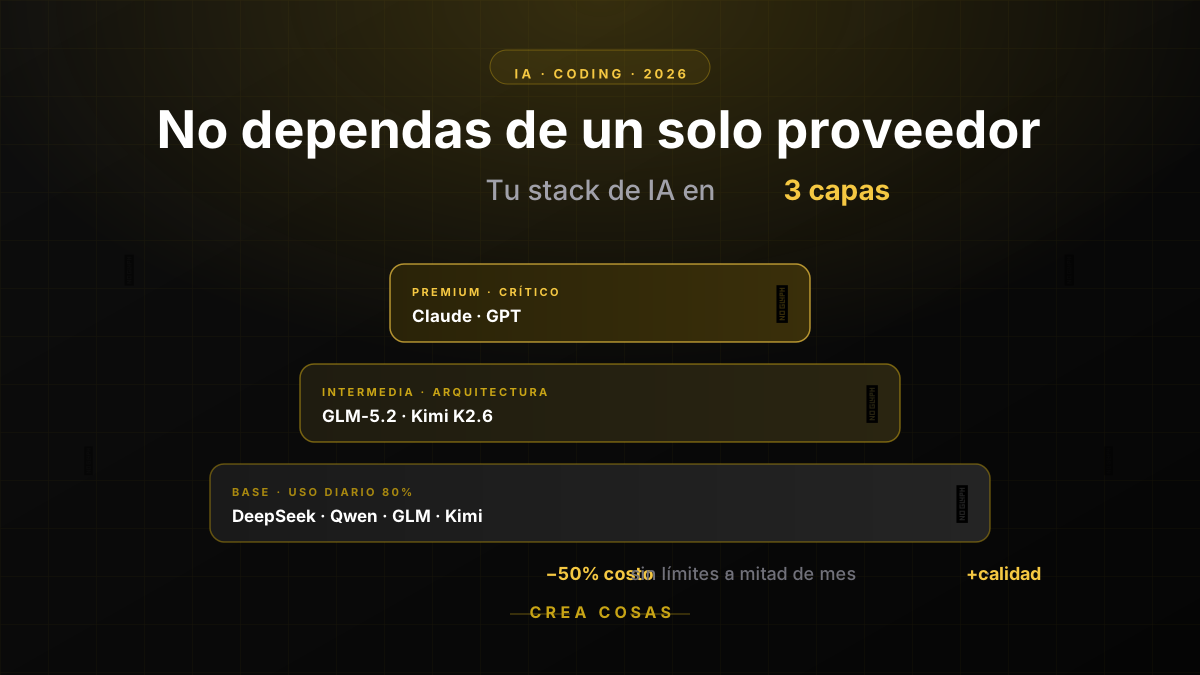
Why in 2026 You Should No Longer Rely on a Single AI Provider for Coding
If you run out of AI quota mid-month, the problem isn't your discipline: it's putting all your eggs in one basket. Learn how to diversify across DeepSeek, Qwen, GLM, Kimi, Claude and GPT to code cheaper and without interruptions.

Z.ai and its GLM models: which is which and when to use each one
A practical catalog of Z.ai's models —GLM-5.3, Flash, 4.6V, OCR, GLM-Image, CogVideoX and the Coding Plan—: what each one does, what it costs, and how to pick the right one for every task.

How to Install OpenCode and Code with AI, Step by Step
Install OpenCode (CLI), connect it to a provider and run your first agent in your repo. Includes OpenCode Go with $5 in credit. Not a pricing post.
Partnerships
Tools I use every day, on better terms for this community.